

Your Professional Electronic Screen Supplier
XINXIANG KAIRUI REFRIGERATION EQUIPMENT CO., LTD,is a professional manufacturing company integrating scientific research, design,production sales and service that serve the global. Our factory mainly produce all kinds of refrigeration filter and can be used for Carrier YORK, TRANE McQuay Bitzer Refcomp brand refrigeration units such as the supporting filter spot sales (part). We also sell chiller spare parts for these brands.
Professional Team
Our team of proficient experts is dedicated to building long-term partnerships with clients by delivering impeccable and reliable services.
Custom Service
We provide tailored solutions for the customization of various filter types to meet specific customer requirements.
Reasonable Price
We are committed to offering superior service and high-quality products at competitive and cost-effective prices.
Advanced Equipment
We have adopted world-leading technology and equipment from Europe and the United States, and have implemented robust quality control procedures and advanced production lines.
-
![York Keypad]() York KeypadYork Keyboard 024 30933000 is mainly used in the control panel of York central air conditioning, as an important input device for operators to interact with the air conditioning system. Whether it is
York KeypadYork Keyboard 024 30933000 is mainly used in the control panel of York central air conditioning, as an important input device for operators to interact with the air conditioning system. Whether it is -
![Trane UC800 Screen MOD02138]() Trane UC800 Screen MOD02138Trane UC800 color screen MOD02138 is an important control equipment in Trane air conditioning system. As the core control unit of the system, it is responsible for receiving and processing signals
Trane UC800 Screen MOD02138Trane UC800 color screen MOD02138 is an important control equipment in Trane air conditioning system. As the core control unit of the system, it is responsible for receiving and processing signals -
![Trane MOD01924 Display Screen]() Trane MOD01924 Display ScreenTrane display MOD01924 as a key control component of Trane central air conditioning system, is an important spare part of Trane CHiller CH530 display. It plays a crucial role in the operation of the
Trane MOD01924 Display ScreenTrane display MOD01924 as a key control component of Trane central air conditioning system, is an important spare part of Trane CHiller CH530 display. It plays a crucial role in the operation of the -
![Carrier TCarrier Touch Screen Oopsg001652200A]() Carrier TCarrier Touch Screen Oopsg001652200ACarrier touch screen oopsg001652200A is an advanced human-computer interaction device. Mainly used in Carrier's various control systems, such as air conditioning systems, refrigeration equipment
Carrier TCarrier Touch Screen Oopsg001652200ACarrier touch screen oopsg001652200A is an advanced human-computer interaction device. Mainly used in Carrier's various control systems, such as air conditioning systems, refrigeration equipment -
![Carrier 00PSG000072400 Display Module]() Carrier 00PSG000072400 Display ModuleCarrier 00PSG000072400 Display module is a professional display module, designed for Carrier's specific equipment. As a key component of information output, it shoulders the heavy task of presenting
Carrier 00PSG000072400 Display ModuleCarrier 00PSG000072400 Display module is a professional display module, designed for Carrier's specific equipment. As a key component of information output, it shoulders the heavy task of presenting -
![Carrier CEPL131228-01-R-S 4.3 "PIC6 Touch Screen]() Carrier CEPL131228-01-R-S 4.3 "PIC6 Touch ScreenThe Carrier CEPL131228-01-R-S 4.3 PIC6 touch screen is an advanced touch screen designed for specific devices. It is mainly used in Carrier-related control systems as an important interface for
Carrier CEPL131228-01-R-S 4.3 "PIC6 Touch ScreenThe Carrier CEPL131228-01-R-S 4.3 PIC6 touch screen is an advanced touch screen designed for specific devices. It is mainly used in Carrier-related control systems as an important interface for -
![York 024-25258-000 SWITCH KEYPAD]() York 024-25258-000 SWITCH KEYPADYork 024-25258-000 SWITCH KEYPAD is the key control component of York air conditioning. Designed for specific York models to ensure accurate adaptation and stable transmission of operating
York 024-25258-000 SWITCH KEYPADYork 024-25258-000 SWITCH KEYPAD is the key control component of York air conditioning. Designed for specific York models to ensure accurate adaptation and stable transmission of operating -
![York 024-30910-000 Keypad]() York 024-30910-000 KeypadYork Keyboard 024-30910-000 is mainly used in the control panel of York central air conditioning, as an important input device for operators to interact with the air conditioning system. Whether it
York 024-30910-000 KeypadYork Keyboard 024-30910-000 is mainly used in the control panel of York central air conditioning, as an important input device for operators to interact with the air conditioning system. Whether it -
![Carrier Touch Screen]() Carrier Touch ScreenCarrier Electronic Touch Screen 32GB500112 As a key part of Carrier's central air conditioning system, plays an extremely important role in the control of the entire system. With this touch screen,
Carrier Touch ScreenCarrier Electronic Touch Screen 32GB500112 As a key part of Carrier's central air conditioning system, plays an extremely important role in the control of the entire system. With this touch screen, -
![Carrier Display Screen]() Carrier Display ScreenCarrier display 00PSG000281600 as an important part of Carrier 30XW series central air conditioning system, plays a key role in improving the user's air conditioning control experience. Its LCD touch
Carrier Display ScreenCarrier display 00PSG000281600 as an important part of Carrier 30XW series central air conditioning system, plays a key role in improving the user's air conditioning control experience. Its LCD touch -
![Trane Display Screen]() Trane Display ScreenTrane display MOD02092 as a key control component of Trane central air conditioning system, is an important spare part of Trane CHiller CH530 display. It plays a crucial role in the operation of the
Trane Display ScreenTrane display MOD02092 as a key control component of Trane central air conditioning system, is an important spare part of Trane CHiller CH530 display. It plays a crucial role in the operation of the


Specification
|
Panel |
Screen Size |
1233.4(H)mm x 704.7(V)mm |
|
Aspect ratio |
16:09 |
|
|
Resolution |
3840 x 2160 |
|
|
Active Screen Size(H x W) |
1223.5(H)mm x 694.8(V)mm |
|
|
Support color |
1.07B colors |
|
|
Contrast ratio |
1200:1 (Typical) |
|
|
HDR off White Luminance |
350 cd/m2 |
|
|
Viewing angle |
178°(H) / 178°(V) Typical |
|
|
Video and Auido port |
HDMI |
HDMI2.0*1 support 4K 60Hz |
|
DP |
DP1.2*1 |
|
|
RS232 |
3.5mm |
|
|
Speaker |
3.5mm for Aux |
|
|
Power |
Input |
AC100-240V |
|
Total power consumption |
<160W |
|
|
Dimension |
Package ( Width * height * depth) mm |
1360x873x150mm |
|
Monitor ( Width * height * depth) mm |
1240×778×50mm |
Types of Electronic Screen
The electronic screens produced by our company mainly include the following types:
Touch Screen
Touchscreen is a display screen that acts as both an input and output device, allowing users to interact with it by touching the screen's surface. This direct interaction eliminates the need for separate input devices like a mouse or keyboard.
Display Screen
Display screen, also known as a monitor, is a visual interface that presents information from electronic devices like computers, smartphones, and televisions. It's essentially the screen you look at to interact with digital content, displaying images, text, and videos.


Dynamic Content
Electronic screens provide businesses with the capability to display new content at any time, which helps them execute quick changes to their promotions or business updates.
Cost Efficiency
Electronic screens cut down the recurring expenses of printing materials because they eliminate the need for physical updates. The long-term financial benefits become substantial because of this method.
Improved Engagement
The audience stays active because electronic screens implement motion graphics and video elements as well as real-time updates. Such technology enables viewers to experience an interactive modern format.
Remote Management
Through central management systems, businesses can shop for a variety of content across their outlets while saving time and money.
Eco-Friendly
The electronic screen creates environmental benefits through its paperless operation, which helps reduce waste.
Applications of Electronic Screen
Retail
In retail, digital signage is used for in-store promotions, product information, and wayfinding. Electronic screen shelf labels (ESLs) display real-time prices and product details, reducing manual labor and improving pricing accuracy.
Transportation
Airports, train stations, and bus terminals rely on electronic screens for real-time schedule updates, gate information, and passenger alerts. These screens improve the flow of information and help travelers navigate complex environments.
Education
Classrooms are becoming increasingly digital, with interactive whiteboards, projectors, and tablet displays replacing traditional chalkboards. These tools foster collaboration, accommodate diverse learning styles, and make lessons more engaging.
Healthcare
Hospitals and clinics use electronic screens for patient check-in, wayfinding, and health information dissemination. Electronic screens in waiting rooms keep patients informed and entertained, reducing perceived wait times.
Advertising and Entertainment
Digital billboards and LED video walls have transformed outdoor advertising, enabling eye-catching visuals and targeted messaging. In entertainment venues, large displays enhance live performances, sporting events, and public celebrations.
Corporate and Public Spaces
Conference rooms and lobbies often feature digital signage for visitor greetings, internal communications, and event schedules. In public spaces, electronic screens are used for municipal messaging, weather updates, and emergency alerts.
Precautions For Installing Electronic Screens

Choose The Right Location
Selecting the ideal spot for your electronic screen is essential to guarantee maximum visibility and engagement. Start by conducting a thorough visibility assessment. Walk around the area where you plan to install the screen and observe the traffic patterns.

Ensure Proper Electrical Setup
After pinpointing the perfect location for your electronic screen, you need to confirm it has a reliable electrical setup. First, assess the power requirements of your screen. Check the manufacturer’s specifications to know exactly what voltage and wattage your screen needs.
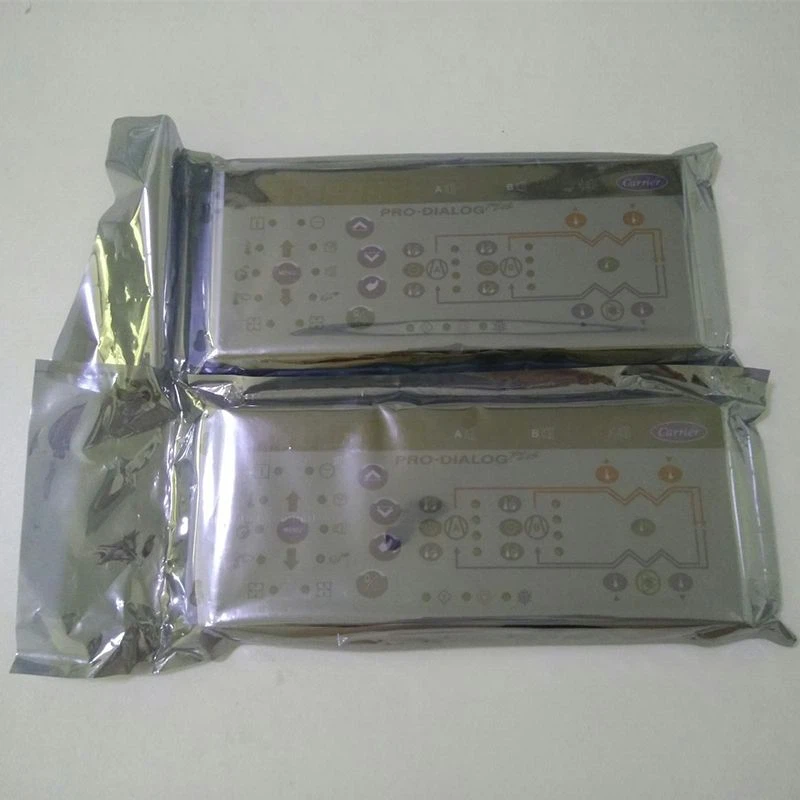
Optimize Screen Settings
To get the best performance from your electronic screen, start by fine-tuning its settings. Properly optimizing your screen settings guarantees vibrant colors, sharp images, and comfortable viewing, making a significant difference in your overall experience.
HDMI: Ideal for connecting laptops, media players, or other HDMI-enabled devices.
DisplayPort: Offers similar functionality to HDMI with potentially higher bandwidth.
USB: Convenient for displaying content directly from USB drives.
Wi-Fi/Ethernet: Enables remote content updates and management, ideal for networked displays, and essential for digital signage software.
System on a Chip (SoC): Some displays have built-in media players that can run content directly from internal storage or cloud-based platforms, eliminating the need for external digital signage hardware.

Customizable Options
Panel sizes available for customization
01
Face treatment options
02
Video inputs
03
Enclosure options
04
Electrical options
05
Packaging and Shipping
|
Packaging |
Carton with pearl bag and cushion inside,pallet and wooden crate available for mass order. |
|
Shipping |
UPS, DHL, FeDex, Sea and air freight, etc |
Our Factory


FAQ
As one of the leading electronic screen manufacturers and suppliers in China, we warmly welcome you to buy high quality electronic screen for sale here from our factory. Good service and competitive price are available.
Popular Products


