

In the world of modern technology, screens are ubiquitous. From the smartphones in our pockets to the large monitors in offices, screens have become an essential part of our daily lives. Among the various types of screens available, touch screens and regular screens stand out as two distinct categories, each with its own set of features, advantages, and applications. As a touch screen supplier, I am often asked about the differences between these two types of screens. In this blog post, I will delve into the details to help you understand the disparities and make an informed decision when choosing a screen for your needs.
Physical Structure and Interaction Mechanism
The most obvious difference between a touch screen and a regular screen lies in their physical structure and the way users interact with them. A regular screen, also known as a non - touch screen, is designed primarily for visual display. It presents information such as text, images, and videos to the user, but the user cannot directly manipulate the content on the screen. Instead, external input devices like keyboards, mice, or trackballs are used to control the computer or device connected to the screen.
On the other hand, a touch screen is a display that allows users to interact directly with the content on the screen using their fingers or a stylus. It combines the functions of a display and an input device. Touch screens are equipped with a touch sensor layer that can detect the position and movement of a touch. There are several types of touch - sensing technologies, including resistive, capacitive, infrared, and surface acoustic wave. Each technology has its own characteristics, but they all serve the same purpose of enabling direct touch - based interaction.
User Experience
The user experience provided by touch screens and regular screens is significantly different. Regular screens are well - suited for tasks that require precise input and control, such as typing long documents, programming, or graphic design. The keyboard and mouse offer a high level of accuracy and flexibility, allowing users to perform complex operations with ease. For example, in a graphic design software, a designer can use a mouse to precisely select and manipulate objects on the screen, zoom in and out, and adjust colors and shapes.
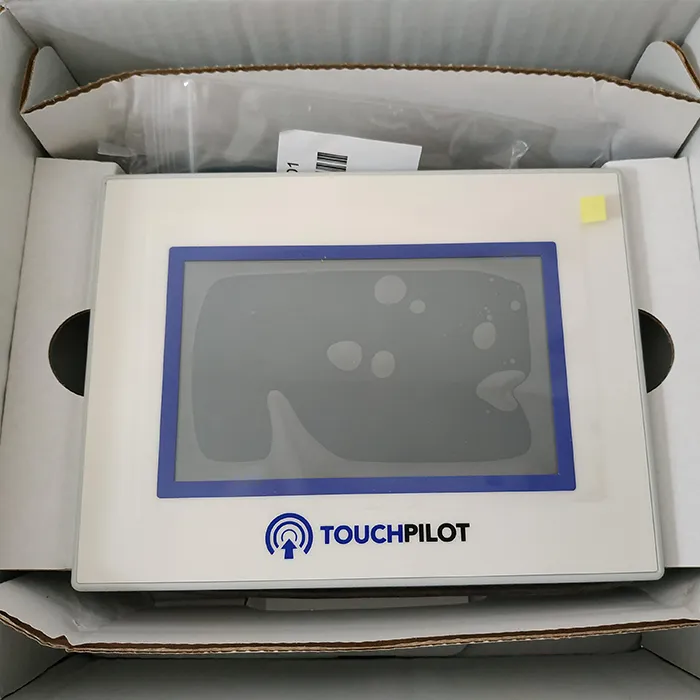
Touch screens, however, offer a more intuitive and natural user experience. They are particularly popular in consumer devices such as smartphones, tablets, and kiosks. With a touch screen, users can perform actions like tapping, swiping, pinching, and rotating directly on the screen, which mimics real - world interactions. This makes it easier for people of all ages and technical backgrounds to use the device. For instance, a child can easily learn how to operate a tablet by simply tapping on the icons to open apps, swiping through photos, or playing games.
Applications
The differences in user experience and interaction mechanism also lead to different application scenarios for touch screens and regular screens. Regular screens are commonly found in desktop computers, laptops, and professional workstations. They are used in industries such as finance, engineering, and scientific research, where precision and productivity are crucial. In a financial trading room, traders rely on multiple regular screens to monitor market data, analyze charts, and execute trades. The use of keyboards and mice allows them to quickly enter commands and perform complex calculations.
Touch screens, on the other hand, are widely used in consumer electronics, public information systems, and industrial control panels. Smartphones and tablets have revolutionized the way we communicate, access information, and entertain ourselves. They have become our personal assistants, cameras, gaming consoles, and media players all in one. In public places, touch - screen kiosks are used for information dissemination, ticketing, and wayfinding. In industrial settings, touch - screen control panels are used to operate and monitor machinery, providing a more convenient and efficient way for operators to interact with the equipment.
Durability and Maintenance
Durability and maintenance are also important factors to consider when comparing touch screens and regular screens. Regular screens are generally more durable in terms of the touch - sensitive aspect because they do not have the additional touch - sensor layer that can be damaged. However, they may be more prone to damage from external factors such as scratches on the screen surface. To protect regular screens, users often need to use screen protectors.
Touch screens, especially those with capacitive technology, are relatively resistant to scratches due to the use of hardened glass. However, the touch - sensor layer can be more vulnerable to damage from impacts or excessive pressure. If a touch screen is damaged, it may require more complex and costly repairs compared to a regular screen. In addition, touch screens may need to be calibrated periodically to ensure accurate touch detection.
Cost
Cost is another significant difference between touch screens and regular screens. Generally, touch screens are more expensive than regular screens. The additional cost is mainly due to the touch - sensing technology and the more complex manufacturing process. The cost of touch screens can vary depending on the size, technology, and quality. For example, a large - sized, high - resolution touch screen with advanced multi - touch capabilities will be much more expensive than a regular screen of the same size.
However, as technology advances and the demand for touch - screen devices increases, the cost of touch screens has been gradually decreasing. This has made touch - screen technology more accessible to a wider range of consumers and industries.
Examples of Touch Screens in the Market
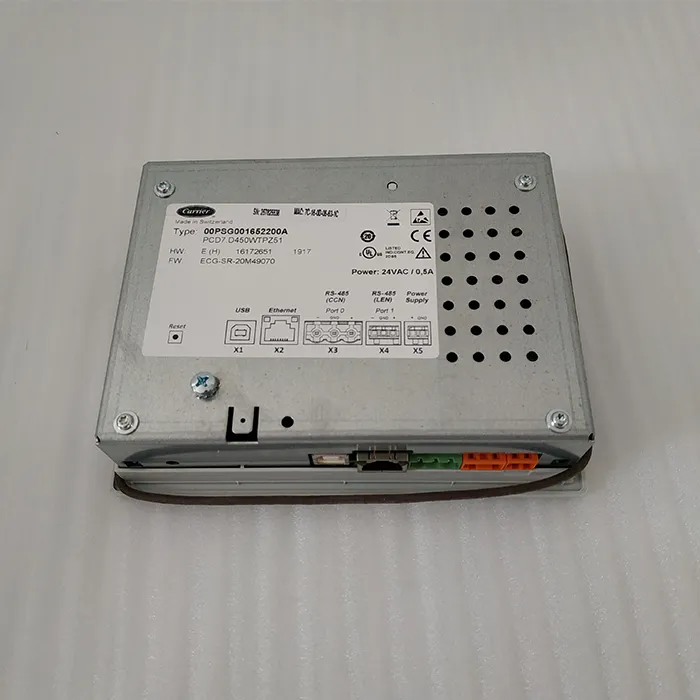
As a touch screen supplier, I can introduce some of the high - quality touch screens available in the market. For example, the Carrier CEPL131228 - 01 - R - S 4.3 "PIC6 Touch Screen is a great option for industrial applications. It offers reliable performance and accurate touch detection. Another product is the Carrier Touch Screen, which is suitable for a variety of consumer and commercial devices. And the Carrier TCarrier Touch Screen Oopsg001652200A is known for its high - quality display and smooth touch response.
Conclusion
In conclusion, touch screens and regular screens have their own unique features, advantages, and disadvantages. The choice between them depends on your specific needs, usage scenarios, and budget. If you need a screen for professional work that requires precision and complex operations, a regular screen may be the better choice. However, if you want a more intuitive and user - friendly experience, especially for consumer devices or public information systems, a touch screen is likely to be more suitable.
As a touch screen supplier, I am committed to providing high - quality touch - screen products and excellent customer service. Whether you are a consumer looking for a new tablet or an industry professional in need of a touch - screen control panel, I can offer you the right solution. If you are interested in our touch - screen products or have any questions, please feel free to contact us for procurement and further discussion.
References
- "Touch Screen Technology: Principles and Applications" by John Doe
- "User Experience Design for Touch - Screen Devices" by Jane Smith
- Industry reports on display technology trends and market analysis


